The short version
- Running several coding agents at once is now normal. The hard part is not starting them. It is getting their work back without them trampling each other.
- In Luminair you line requests up in a queue. With two or more waiting, Branch Out groups them and gives each group its own agent, its own git branch and its own copy of the repo.
- Before anything runs, a restore tag marks where you started. The branches merge into one side branch. Main is never touched by the agents.
- Results wait in Open branches in the sidebar, where you can diff, merge, replay or discard them. Split panes let you watch several sessions at once.
The rough edges were found by using it.
Branch Out shipped in the 18 July 2026 desktop update, alongside the per-session queue. The design notes for it were written the same day as source material for a post like this one. Most of what changed since then came from running it on Luminair's own code, day after day, and hitting the corners. A few examples, each recorded in the source as it happened:

From one assistant to a crew.
For a while, an AI coding session meant one conversation in one folder. Over the last year the tools moved to crews. On 29 October 2025 Cursor released version 2.0 with, in its words, “a new interface for working with many agents in parallel”, and said it “makes it easy to run many agents in parallel without them interfering with one another, powered by git worktrees or remote machines.”
In February 2026 OpenAI followed with a Codex app for macOS. TechInformed described it as “a ‘command center’ for running multiple coding agents in parallel”, with built-in worktrees as “a way to keep parallel agent work separated when multiple efforts touch the same repository.”
Both reach for the same tool, and for good reason. Think of a busy kitchen. Several cooks can work at once, but not on the same cutting board. Each gets a station (a worktree: a second, separate checkout of the same repository), plates go to the pass for checking (a side branch), and only the head chef sends food out to the dining room (main). The danger was never the cooking. It was two people chopping on one board.
Luminair's answer uses the same station idea, but it starts from a different place: your queue. You do not set up agents by hand. You write down what you want, in the order you think of it, and decide later whether it runs one by one or all at once.
Write it down, then decide.
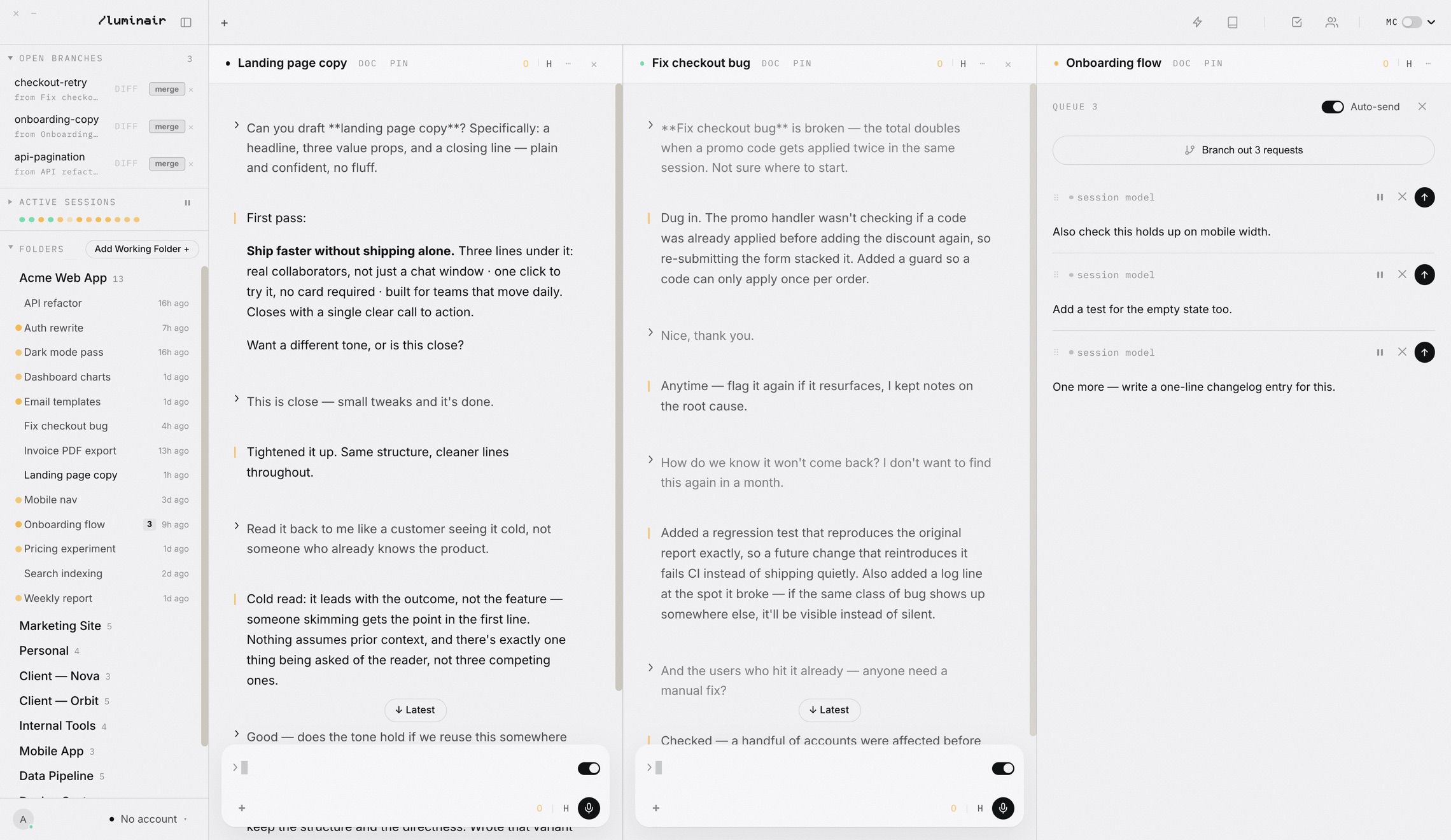
Every session has its own queue. When a model is busy, a new message does not interrupt it; it waits in line. The queue panel lets you reorder, edit, pause or delete items before they run, and Auto-send decides whether the next item fires as soon as the session is free. The queue survives a restart, pictures included, and because it is stored in the cloud your phone can add to the same list.
Three keyboard shortcuts cover most of it (all rebindable in Settings › Keyboard shortcuts):
Open queue
Opens the queue panel for the focused session. Press it again to close.
Send now
Sends the composer immediately, jumping the queue.
Queue for later
Parks the message, paused, for whenever you are ready to send it.
On Windows the Command key is Control. A queue on its own is already useful: you stop sitting idle between prompts. But a long queue in one session is still serial. That is where Branch Out comes in.
One button, many stations.
When two or more queued requests can branch, the queue shows a Branch out N requests button. You can also type //branchout in the composer, or //branchout x3 to try one request three different ways. Pressing it hands the queue to a coordinating agent. Here is what happens next, in order.
Sort and group
Requests that change files are code; questions are research. Code requests that touch the same area share a group so they do not fight; independent ones get separate groups.
Set a restore point
A git tag named luminair/backup-<stamp> is placed on the exact commit you started from, before any agent runs.
Give every group a station
Each code group gets its own branch and its own worktree in a temporary folder, with its own agent. Research groups run read-only and answer straight into the chat.
Merge into one side branch
The group branches merge, in a fixed order, into luminair/branchout-<stamp>-<session>. If a conflict cannot be fully resolved, that merge is abandoned and the group's work stays safe on its own branch.
The restore point is the first thing the code lane does. This is the excerpt, verbatim:
// ---- backup layer: a named restore point at the exact starting commit ----
await git(root, ['tag', 'luminair/backup-' + stamp, base]);

wtBase = path.join(app.getPath('temp'), 'luminair-branchout', stamp);
fs.mkdirSync(wtBase, { recursive: true });
How many agents at once?
There is no fixed number, on purpose. A laptop on battery with twenty browser tabs and an idle desktop with plenty of memory can carry very different loads. Branch Out starts up to three agents straight away. After that it measures the machine before each new one: another agent is admitted only while free memory and CPU load still show headroom. A hard ceiling of eight stops a huge batch from spawning without limit. If the machine cannot be measured, it does not add load.
Small jobs take the short road
For bigger groups, each branch goes through several passes: implement, review, verify. That is worth it for a real feature and wasteful for a one-line fix. Early on it caused a strange result: branching out eight short requests took far longer than running the same eight one after another. Since 19 September a group counts as small when it holds at most two requests, their text adds up to 600 characters or fewer, and none carries an image. Small groups run a single implement pass and go straight to the merge.
Nothing lands until you say so.
Every branch-out branch that is not yet in main shows up at the top of the sidebar under Open branches, with a count. While a branch-out is still building, its row is already there, marked as building. When it is done, each row tells you which session it came from and gives you a few plain buttons.
- 1diff shows exactly what this branch changed compared with main, before you merge anything.
- 2merge merges into main and clears the row. ✕ discards the branch, after backing it up to a
.recovery/folder first. - 3If the branch conflicts with main, the button reads merge anyway. When the conflict is resolvable you get three choices: Replay on main replays the branch's commits on top of main and keeps both sides' work (and changes nothing if a commit cannot apply); Keep branch and Keep main each win every clashing line for one side.
Rows also appear for sessions working in a linked worktree. If that worktree has uncommitted edits, there is nothing to merge yet, so the row offers commit instead. And because a git stash lives on no branch and can vanish quietly (as that gold redesign did), shelved stashes are listed here too, with view, restore and discard.
This is the same idea as a code review queue, minus the ceremony. The agents did the work in their stations. You taste each plate before it leaves the kitchen.
Watch them side by side.
Branch Out is for work you can hand off. Plenty of work you want to watch. For that, Luminair splits the window into panes, and every pane is a full, live session with its own model and its own queue.
- ⌘ N opens a new session in a split next to the focused one, in the selected folder.
- Drag a session from the sidebar onto the edge of a pane to split there. A session that is already open is revealed instead of opened twice.
- ⌘ ⇧ A (Tidy layout) evens out every pane and resets the sidebar width.
On the free Casual tier you can run three sessions at the same time; Pro removes that cap. Branch Out itself is part of Pro.
A good rhythm looks like the screenshot near the top: one pane doing work you want to watch closely, one answering a question, and a third collecting a queue that you branch out once it gets long enough.
Five steps to your first fan-out.
- 1Open a session in a folder that is a git repository.
- 2Press ⌘ E to open its queue, and add a few requests with ⌥ ↵ (or just keep typing while the model works).
- 3Press Branch out N requests at the top of the queue, or type
//branchout. - 4Watch the groups build in the queue panel. Answers to questions arrive in the chat as they finish.
- 5In the sidebar under Open branches, press diff, then merge the branches you want.
The feature pages go into more detail: Queue, Branch Out, Open Branches and Split & Tab View.
What git guarantees, and what it doesn't.
The isolation in Branch Out is real where git provides it: separate worktrees, separate branches, a restore tag, merges you approve. Two things are softer, and we would rather say so.
Worth knowing
- Each agent is told, as a hard rule in its instructions, to stay inside its own copy of the repo and never run checkout, merge or push, or touch the network. That rule is an instruction to the model, not an operating-system sandbox.
- Conflict resolution by the coordinating agent is best effort. A merge it cannot finish cleanly is aborted and reported, never handed over half done.
- Requests that carry images do not branch; they stay in the queue.
- We have not published timing or cost comparisons between branching out and running a queue one by one, beyond the slowdown we found and fixed.
Sources
- Cursor · 29 October 2025Introducing Cursor 2.0 and Composer
- TechInformed · February 2026OpenAI ships Codex macOS app as AI coding shifts toward parallel agents
Branch out your queue
Line up the work, press one button, and merge only what you like.