The short version
- In a survey of 906 engineers, The Pragmatic Engineer found that 70% use two to four AI tools at the same time.
- Luminair treats every one of those tools as an engine: one file in
desktop/engines/. Fifteen engine files are on disk today. - A session is not married to an engine. Pick another engine's model and the next turn runs there, with a catch-up note of what it missed.
- Sessions sit side by side in panes, each on its own model, so you can compare answers without switching windows.
The tool we live in.
We are the heaviest multi-tool users we know. Luminair's own code is written in Luminair, in sessions that hop between Claude, Codex and the rest as the work changes shape. This post is no exception: it was researched and drafted in a Luminair session running on the Claude CLI lane, with the claims checked against the source files it quotes.



Too many tabs.
Early in 2026, The Pragmatic Engineer asked its readers which AI tools they use at work. 906 responded. The headline for us was one line: 70% use between two and four tools at once, 15% use a single tool and 15% use five or more. Claude Code, chatbots, GitHub Copilot, Cursor, Codex and Gemini CLI were the most used.
That matches what we saw in our own work. One model plans well. Another writes tight code. A third cites its sources. A fourth runs on the laptop with the Wi-Fi off. The trouble is not the models. It is everything around them:
- “Which window had the context for this bug?”
- “Paste the whole conversation into the other tool again.”
- “Which login is this billed to?”
Think of a travel adapter. You do not buy a new laptop for every country; you carry one plug that fits every socket. Luminair's engine registry is that plug. You bring your own accounts, keys and local models, and they all show up in one place.
One file per engine.
In Luminair, a turn runs on an engine. Claude is one engine, Codex is another. Each engine is a single JavaScript file in desktop/engines/. The registry was first tracked in git on 16 August 2026 (commit 84435f42) with six engines and a _TEMPLATE.js to copy. The comment at the top of the template sums up the contract: copy the file, fill in the parts marked TODO, restart. The model picker, the account menu, badges, colours, per-session engine memory, the run, Stop, queues and token meters all pick it up.
The loader is deliberately dull. It reads every .js file in the folder, skips the ones that are not engines, and never lets one bad file take the app down:
    if (f === 'index.js' || f === 'runner-cli.js' || f.endsWith('-run.js') || f.startsWith('_') || f.startsWith('.')) continue;
    try {
      const mod = require(path.join(__dirname, f));
      const raw = typeof mod === 'function' ? mod(_host) : mod;
      if (!raw || !raw.id) continue;
      const spec = normalize(overlayRaw(raw));
      if (out.some((e) => e.id === spec.id)) continue;   // first file with an id wins
Three details in those lines carry most of the design. Files starting with an underscore are ignored, so templates and shared helpers live next to engines without registering. Files ending in -run.js are launchers that the app spawns as separate processes, so they are never loaded inside the app. And normalize() fills in every field an engine leaves out: only id is required, so a half-finished engine degrades instead of crashing.
overlayRaw() is the other quiet trick. Since 6 September a small model catalog fetched from our backend can add a model to an engine, or patch its label, without an app release. If the catalog cannot be reached, the built-in lists stand alone.
| Engine | File | How you connect |
|---|---|---|
| Cloud | ||
| Claude | claude.js · claude-cli.js | Your Claude account. Two lanes: the Agent SDK, and the real Claude Code binary |
| Codex | codex.js | Your own ChatGPT sign-in |
| OpenAI API | openai.js | API key; lives inside the Codex card |
 Gemini Gemini | gemini.js | A Google AI Studio key |
| Antigravity | antigravity.js | Google sign-in through Google's agy tool |
 Perplexity Perplexity | perplexity.js | Your own key; answers with live sources |
 Kimi Kimi | kimi.js | Your Kimi Code subscription |
 Grok Grok | grok.js | Your own xAI key |
 Meta Meta | muse.js | Meta sign-in for Muse Code; Muse Glimmer can also run locally |
| On this computer | ||
 Qwen Qwen | qwen.js | One-click download, runs offline |
 GLM GLM | glm.js | One-click download, runs offline |
 DeepSeek DeepSeek | deepseek.js | One-click download, runs offline |
 Ollama Ollama | ollama.js | Every model you already pulled |
 LM Studio LM Studio | lmstudio.js | Whatever LM Studio is serving on 127.0.0.1:1234 |
failure-policy.js and the -run.js launchers live in the same folder but register nothing.The conversation follows you.
Here is the part that makes one window more than a launcher. A comment in main.js dated 14 August 2026 records the decision: a session is no longer married to the engine it was born on. The model picked for a turn decides the engine, every turn.
Under one session id, each engine keeps its own native thread, plus a timestamp of the last turn it saw. When you switch, the new engine is handed only what it missed. Picture a relay race where the next runner gets a note in the baton: here is what happened while you were waiting.
Two rules keep this honest. The handoff never pretends: when turns are dropped for space, the note says so. And when a switch forces a brand-new thread (for example, a usage limit hops the session to another account that cannot resume the first account's thread), the handoff carries the whole conversation instead of only the missed turns.
Ask twice, compare once.
The other half of “one window” is literal. Luminair lays sessions out in panes. Drag a session from the sidebar onto the left, right, top or bottom edge of an open pane and it opens beside it; drop it in the centre and it replaces what was there. Each pane has its own model chip, so the left pane can be on Claude and the right on Codex while both work in the same folder.
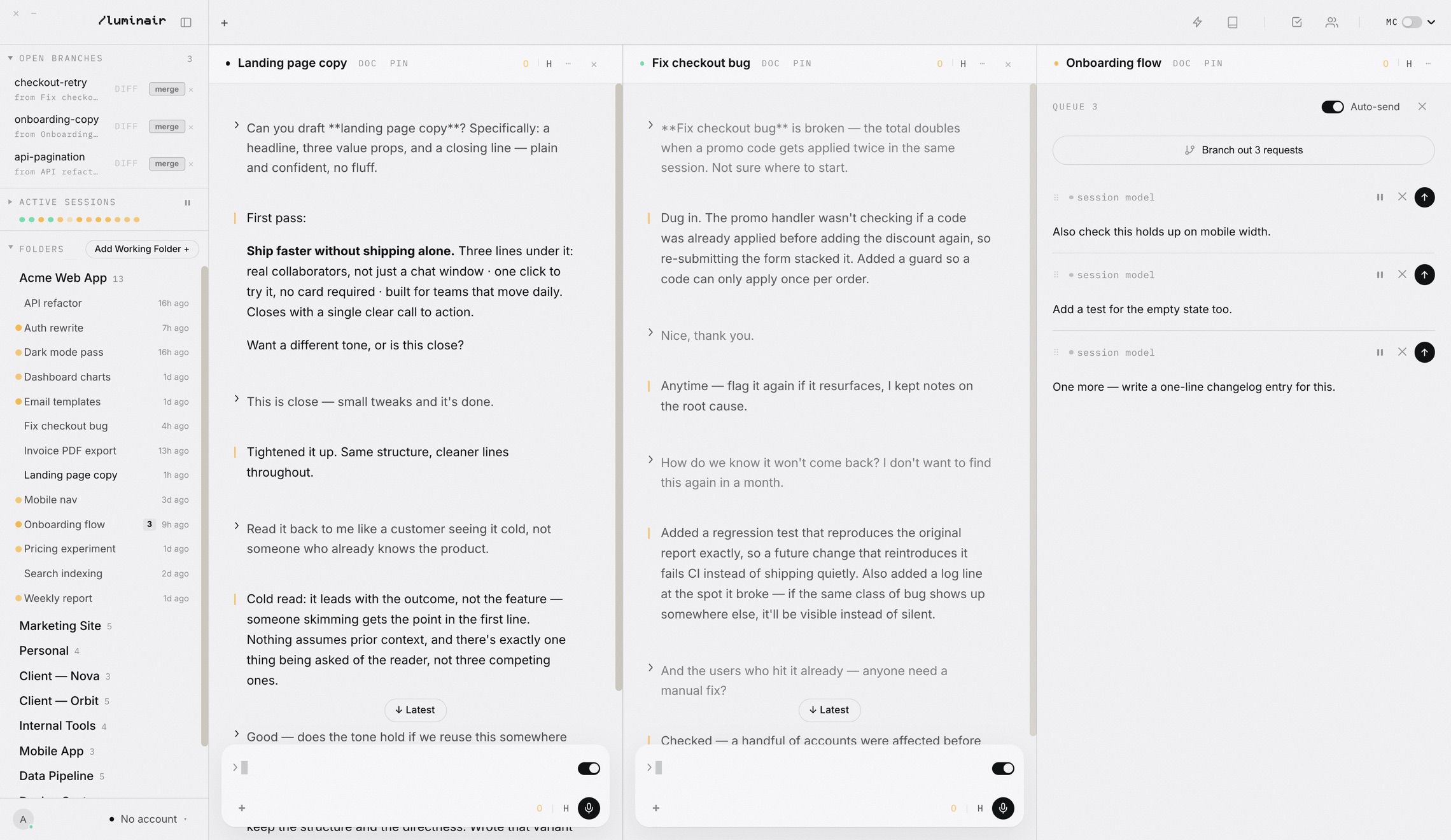
On the free Casual plan you can run three sessions in parallel; Pro removes the limit. Opening a session that is already on screen focuses its pane instead of making a second copy, because two panes writing to one session was exactly the kind of bug that leaves a blank pane. More on layouts on the split view page.
From picking to routing.
Once every model is one click away, the next question is which one to click. Augment Code's routing guide puts the idea in one sentence:
Luminair does this per turn with its decision models, Laya and Jev. Small edits go to a light model without waiting for a classifier; harder work is sized up and matched to a model that is good enough. Because the switch in section 05 has a real cost, the router by default stays with your current provider unless you allow otherwise. The full story is in The right model for every turn.
Where the engines live.
- 1Open Settings › Models. Pick Cloud or Local at the top, then click an engine's card to sign in, add a key, or download a model.
- 2In any pane, click the model chip in the pane header (its tooltip reads Model & thinking for this session), then Model.
- 3The list shows every connected engine's models under a small engine title. Pick one from another engine and the next turn runs there.
- 4Not sure? Help at the bottom opens a guide built from the same list, so it never suggests a model you cannot use.
Now write the migration.
Next turn runs on the model you pick; the plan from the earlier turns travels with it.
Every engine on the multi-model page is one of the files in Fig 02. When a new one ships, it arrives the same way: one more file in the folder.
Bring your own models
Connect the accounts you already pay for, add a local model, and keep one thread across all of them.