The short version
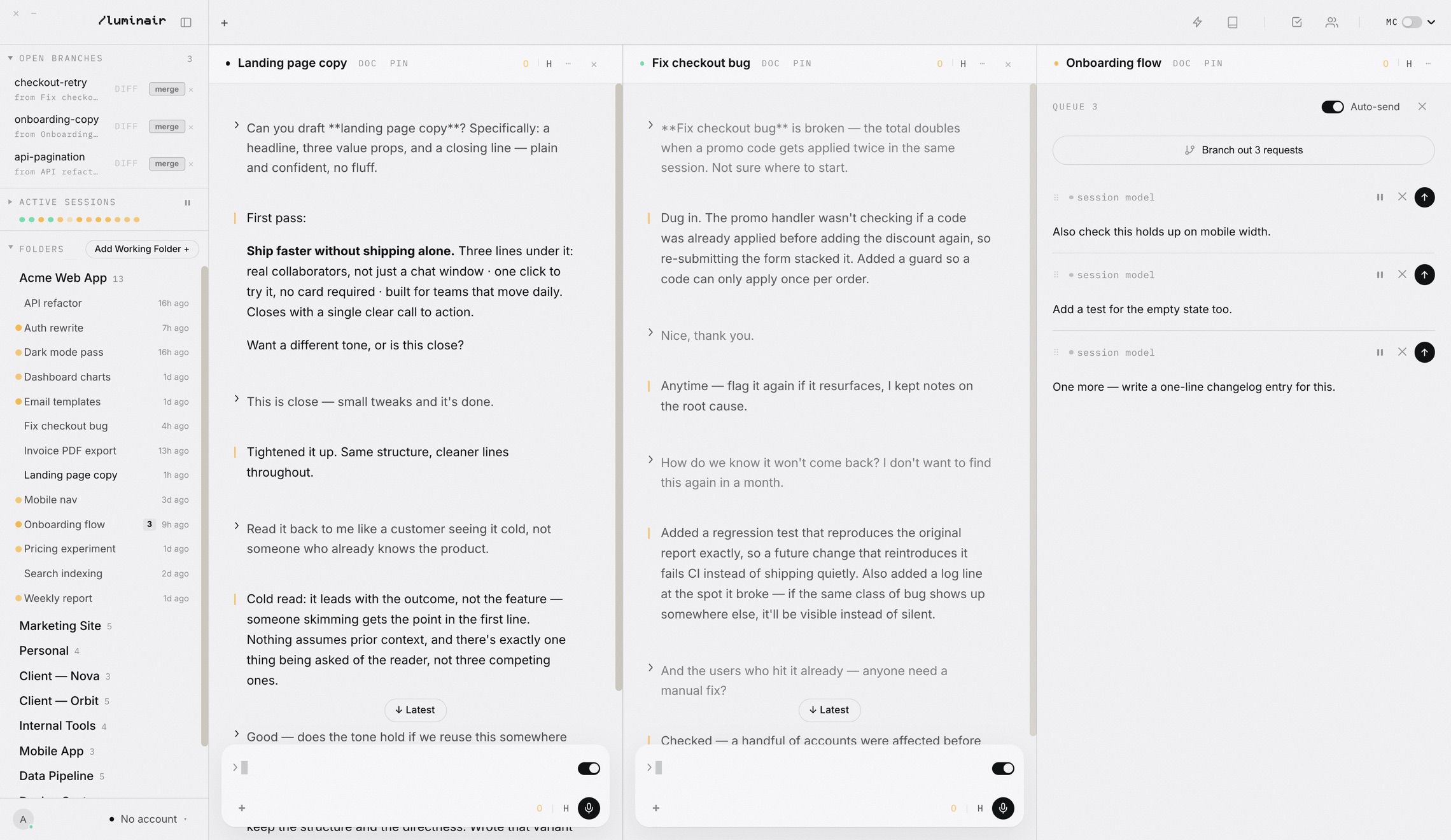
- The app window in the “Many minds. One train of thought.” section of our homepage is a capture of the real app, not a picture of it and not a rebuild of it.
- A script starts a throwaway copy of the desktop app, connects to it over the Chrome DevTools Protocol, switches on the app's own demo mode, and saves the live DOM.
- A 135-line script on the website adds back only the clicks that make sense: folders fold, tabs and layouts switch, the account menu opens, the composer takes a caret but no typing.
- When the app's UI changes, we rerun the capture instead of redrawing a mock.
The capture was an agent job.
The capture script and the replica landed on 25 September 2026, in two commits that both carry a Claude co-author line. It is the kind of job agents are now good at, because the agent can start the app, attach to it, look at what came out and try again. This post was drafted the same way: a session reading the script, the replica and the git history, with every outside claim checked against the page it links to.
Letting the agent see the page.
For most of the short history of AI coding tools, the agent wrote front-end code it could not look at. It changed a stylesheet and hoped. The Chrome team put it plainly when it announced Chrome DevTools MCP on 23 September 2025: “Coding agents face a fundamental problem: they are not able to see what the code they generate actually does when it runs in the browser. They're effectively programming with a blindfold on.”
The fix was an MCP server, a plug-in that exposes tools to the agent, which drives a real Chrome. Underneath, as Addy Osmani wrote two days later in Give your AI eyes, it rests on the Chrome DevTools Protocol, “Chrome's native debugger interface”. In December 2025 Chrome added a way for the server to attach to the browser session you already have open, with a permission dialog each time. When that post reached the front page of Hacker News in March 2026, the thread drew 604 points and 234 comments.
The protocol is the interesting part for us. It is not Chrome-only in practice: Electron apps are built on Chromium, so a desktop app started with a debug port speaks the same protocol. That means an agent can open Luminair itself the way it would open a web page: read the DOM, run code inside the window, and take the result away.
Every redesign broke the picture.
Before the capture, the homepage showed a hand-built HTML version of the app. It looked close enough on the day it was made. Then the app changed, and the mock did not. The header comment on the capture script records why it exists: “A hand-built HTML mock drifted off-brand every time the app changed; this captures the real DOM instead.”
The brief behind it, recorded in the same comment, was that the hero must be “100% a screenshot of our UI” and must be clickable. A screenshot is exact but dead. A mock is alive but wrong. The capture is both: exact because it is the app's own markup and CSS, alive because the markup still responds to a small script.
We had used the trick once before. Three days earlier, a design bench script had started capturing the running app's DOM into a local page, so styling passes could be tried in a normal browser tab that reloads on every save. The homepage capture reuses the same moves and adds a staged scene.
Attach, stage, snapshot.
The first step is a clean instance. The script's usage notes launch Electron from the source folder under env -i, with a debug port and a profile folder in /tmp. The profile matters: the app reads an OW_USER_DATA override so a test copy never touches the real accounts and folders, and a fresh profile opens on the login screen, which the script simply removes.
const browser = await chromium.connectOverCDP('http://127.0.0.1:' + PORT);
const page = browser.contexts().flatMap((c) => c.pages())
  .find((p) => /index\.html/.test(p.url()));
await page.setViewportSize({ width: 1680, height: 940 });
await page.evaluate(async () => {
  try { removeConnectGate(); } catch {}
  window.checkPaywall = () => {};
  enterDemo('expert');
  // ...three accounts, four layouts, a queue
});
enterDemo is not something we wrote for the website. It is the app's own Demo Account switch, which sits in the account menu for admins and swaps the whole workspace for a fake one, with a made-up user called Alex Rivera, so screenshots never show real work. It freezes workspace saves while it is on, so the fake layout can never overwrite the real one, and it restores everything on exit. It has three views: First run, Casual and Expert. The capture uses Expert.
From there the script sets the stage with ordinary app functions: three connected accounts (Claude, Codex and Antigravity) with fixed usage figures, four named layouts, and a three-column Build layout. The left column is a group of four session tabs, the middle one a single session, and the right one a session with a queue and a running Solace branch-out card.
Then it takes the pictures, except they are not pictures. For each layout it renders the arrangement, scrolls every thread to its latest message, opens the queue panel and saves the pane area's HTML. Last, it clones the whole document with the Build layout showing.
Removed from the clone
- ×Every
<script>tag - ×The Content-Security-Policy meta tag
- ×The boot cover and the old demo bar
- ×Overlays: Quick Ask, Settings, voice, image viewer, permissions intro
- ×The Journal browser, plus the terminal and Journal stylesheets
Kept or fixed up
- ✓The full DOM, class names and all
- ✓
luminair://app/links rewritten to plain relative paths - ✓Checkbox state copied into the
checkedattribute before cloning - ✓Four
<template>blocks, one per layout - ✓A
noindextag,demo.cssanddemo.js
page.evaluate in the capture script. The checkbox line matters because serialised HTML carries attributes, not the live state of a toggle. Without it, every switch would be saved in its default position.The output is one file, website/demo/app.html. The current one is 312,332 bytes and holds exactly one script tag, the replica's own. The app's stylesheet and skin are copied next to it unchanged, along with its fonts, which is why the replica looks right: it is wearing the same CSS the app ships.
Two gotchas are written into the notes. The layout helper resets custom column widths, so the script puts the 1.45 : 1 : 0.95 split back after every render. And the app window is found by its URL, so the capture stops with an error if no window on port 9333 is serving the app's index.html.
Alive, but only where it's honest.
A captured DOM has no behaviour; the app's scripts were stripped on purpose. So the website adds demo.js, 135 lines that bring back a short list of interactions and block everything else. On the homepage the replica loads in an iframe that is always 1680 by 940 pixels inside, scaled with a CSS transform to fit the width of the page.
| Action | What happens |
|---|---|
| Fold a folder | The folder row toggles open and closed, as in the app. |
| Scroll a session | Threads scroll; each starts at its latest message. |
| Switch layout | Build, Review, Research and Writing swap in their captured pane arrangements. |
| Switch session tab | The four-tab group on the left shows the chosen session. |
| Open accounts | The switcher opens; picking an account moves the “using now” mark and the label. |
| Branch-out card | The request counter ticks up every 1.9 seconds and loops. Staged: no agent is running. |
| Type in the composer | It takes focus and shows a caret. Every keystroke, paste and drop is cancelled. |
| ×Everything else | Links and buttons do nothing. Drag, right-click and form submits are blocked. |
The rule behind the list is simple: anything that would pretend to do work is either blocked or clearly staged. You can click a layout tab and get the real Research layout, because that arrangement was captured from the app. You cannot send a message, because nothing is on the other end, so the composer swallows the keystroke instead of faking a reply.
The one staged motion is the Solace card. The captured text reads “4 of 4 agents working · 0/11 requests done”, and a timer counts it up so the card does not look frozen. We would rather say that here than let it pass for a live run.
What a capture can't do.
Worth knowing
- The capture is a snapshot. It stays exact only as long as someone reruns it after a UI change; the refresh is a manual step, not a build hook.
- All content is demo data. Session titles, the user and the usage figures are made up by demo mode and the script.
- We have not measured how the replica's load time compares with the flat image. The captured page and its stylesheets weigh more than the single picture.
- The capture uses the same protocol as Chrome DevTools MCP, not the MCP server itself.
For a feature-by-feature look at the layouts shown in the hero, see Layouts and Split & Tab View.
Sources
- Chrome for Developers · 23 September 2025Chrome DevTools (MCP) for your AI agent
- AddyOsmani.com · 25 September 2025Give your AI eyes: Introducing Chrome DevTools MCP
- Chrome for Developers · 11 December 2025Let your Coding Agent debug your browser session with Chrome DevTools MCP
- Hacker News · 15 March 2026Chrome DevTools MCP (2025)
- Chrome DevTools Protocol · referenceChrome DevTools Protocol
Click around the real thing
The hero on our homepage is the app itself. The download is the rest of it.